

Hello. I'd like to share how we've used react hook form at our company. Rather than focusing on how react hook form is implemented, I'll primarily discuss the problems it helped us solve.
What is react-hook-form?
https://react-hook-form.com/ First, react-hook-form is a library that efficiently manages form data states and significantly reduces the amount of code. (It's also a key library used by Toss.)
When is it used?
It can be used in any scenario where a user handles JSON data through an event. For states managed as objects, you might not even need to use useState or useReducer.
e.g., all information input and modification, filter search functionality, user registration, login, etc.
Simple react hook form Example
I'll explain with a very simple example below.
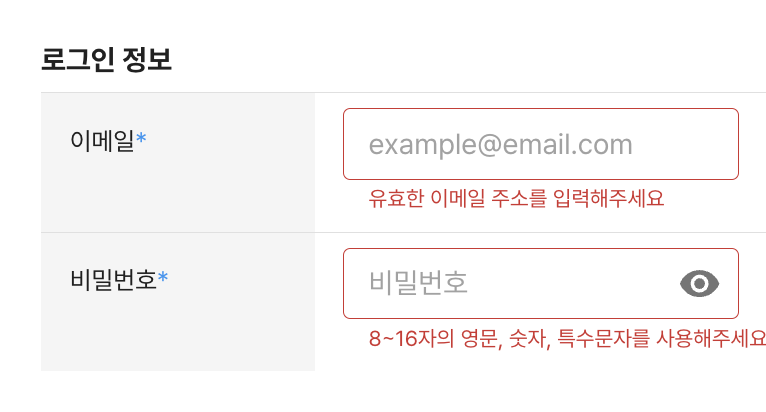
This is a very common user registration form. We'll need states for email and password, as well as error message states.
First, I'll show the code written without using react hook form.
Form Management using useState
- container
const Container = React.memo(function Container() {
  const [state, setState] = React.useState({ email: '', password: '' });
  const [errorMessage, setErrorMessage] = React.useState<{ email: null | string; password: null | string }>({
    email: null,
    password: null,
  });

  return (
    <VStack gap={1} width={'100%'}>
      <Typography variant="Title_Looko">로그인 정보</Typography>

      <EmailForm state={state} setState={setState} errorMessage={errorMessage} setErrorMessage={setErrorMessage} />
      <PasswordForm state={state} setState={setState} errorMessage={errorMessage} setErrorMessage={setErrorMessage} />

      <Button onClick={() => {
        	//... state 핸들링
        }} color="primary" variant="contained">
        다음
      </Button>
    </VStack>
  );
});
- email input
const EmailForm = ({
  state,
  setState,
  errorMessage,
  setErrorMessage,
}: {
  state: {
    email: string;
    password: string;
  };
  setState: React.Dispatch<
    React.SetStateAction<{
      email: string;
      password: string;
    }>
  >;
  errorMessage: {
    email: null | string;
    password: null | string;
  };
  setErrorMessage: React.Dispatch<
    React.SetStateAction<{
      email: null | string;
      password: null | string;
    }>
  >;
}) => {
  return (
    <FormRow
      label="이메일"
      inputComponent={
        <Input
          error={!!errorMessage.email}
          value={state.email}
          onChange={e => {
            const value = e.target.value;
            if (!value) {
              setErrorMessage(prev => ({ ...prev, email: '이메일을 입력해주세요' }));
              return;
            }

            if (!isValidEmail(value)) {
              //유효한 email인지 validation 하는 함수
              setErrorMessage(prev => ({ ...prev, email: '유효한 이메일 주소를 입력해주세요' }));
              return;
            }

            setErrorMessage(prev => ({ ...prev, email: null }));
            setState(prev => ({ ...prev, email: e.target.value }));
          }}
        />
      }
      errorMessage={errorMessage.email}
    />
  );
};
- password input
const PasswordForm = ({
  state,
  setState,
  errorMessage,
  setErrorMessage,
}: {
  state: {
    email: string;
    password: string;
  };
  setState: React.Dispatch<
    React.SetStateAction<{
      email: string;
      password: string;
    }>
  >;
  errorMessage: {
    email: null | string;
    password: null | string;
  };
  setErrorMessage: React.Dispatch<
    React.SetStateAction<{
      email: null | string;
      password: null | string;
    }>
  >;
}) => {
  return (
    <FormRow
      label="비밀번호"
      inputComponent={
        <Input
          error={!!errorMessage.password}
          value={state.password}
          onChange={e => {
            const value = e.target.value;
            if (!value) {
              setErrorMessage(prev => ({ ...prev, password: '비밀번호를 입력해주세요' }));
              return;
            }

            if (!isValidPassword(value)) {
              //유효한 password인지 validation 하는 함수
              setErrorMessage(prev => ({ ...prev, password: '8자~16자의 영문, 숫자, 특수문자를 사용해주세요' }));
              return;
            }

            setErrorMessage(prev => ({ ...prev, password: null }));
            setState(prev => ({ ...prev, password: e.target.value }));
          }}
        />
      }
      errorMessage={errorMessage.password}
    />
  );
};
Voila! A very long piece of code is complete.
It was really difficult to write, from passing many props to handling errors...
Despite the effort, there are also performance issues.
Since useState is used to manage the object, even just changing the password causes continuous re-rendering of both the Container component and the EmailForm component.
If this phenomenon occurs with data where forms are in a list... it would lead to truly terrible performance.
Form Management using react-hook-form
- Container
const Container = React.memo(function Container() {
  const methods = useForm<{ email: string; password: string }>();

  return (
    <VStack gap={1} width={'100%'}>
      <form
        onSubmit={methods.handleSubmit(v => {
          // 데이터 핸들링
        })}
      >
        <FormProvider {...methods}>
          <EmailForm />
          <PasswordForm />
        </FormProvider>
      </form>
    </VStack>
  );
});
- EmailForm
const EmailForm = () => {
  const {
    register,
    formState: { errors },
  } = useFormContext<{ email: string }>();
  return (
    <FormRow
      label="이메일"
      inputComponent={
        <Input
          {...register('email', {
            required: '이메일을 입력해주세요',
            validate: v => isValidEmail(v) || '유효한 이메일 주소를 입력해주세요',
          })}
        />
      }
      errorMessage={errors.email?.message}
    />
  );
};
- PasswordForm
const PasswordForm = () => {
  const {
    register,
    formState: { errors },
  } = useFormContext<{ password: string }>();
  return (
    <FormRow
      label="이메일"
      inputComponent={
        <Input
          {...register('password', {
            required: '비밀번호를 입력해주세요',
            validate: v => isValidPassword(v) || '8자~16자의 영문, 숫자, 특수문자를 사용해주세요',
          })}
        />
      }
      errorMessage={errors.password?.message}
    />
  );
};
It seems to have taken less than a tenth of the time compared to writing the useState example above.
It's really simple, isn't it? Can you see how much the code has been reduced?
The amount of code when managing numerous form data with state was truly dreadful.
Furthermore, react hook form handles components as uncontrolled components, optimizing rendering.
- *Code size, rendering,
props drilling** Simply using react-hook-form significantly lowers code complexity and optimizes performance.
Real-world Problem Scenarios
I'll explain the improvements based on scenarios we encountered at our company.
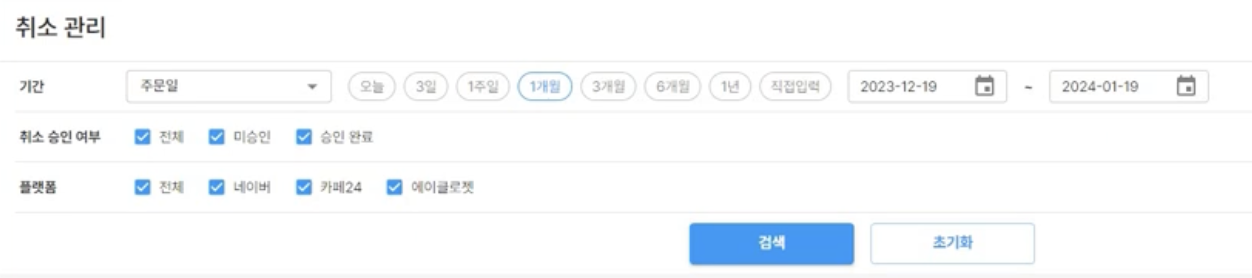
This is a commonly seen filter UX. To briefly explain, it's a filter that fetches a data list for managing canceled products!
Before adoption, it was written like this:
- Before Adoption (Does not match design. Please understand only the business logic!)
type CancleOrderRequestType = { // 서버 query 데이터와 일치하는 타입 필터 UI와 무관
	toDate: number; //기간 to 한달전
  	fromDate: number; //기간 from 오늘날짜
  	cancleStatus: '전체' | '미승인' | '승인완료'// 취소 승인 여부
  	platform: '전체' | '네이버' | '카페24' | '에이클로젯'; //플랫폼
	page: number;
	pageSize: number;
	userID: string;

	...
}
const Container = React.memo(function Container() {
  const [state, setState] = React.useState<Partial<CancleOrderRequestType>>({//initRequest});

  const [errorMessage, setErrorMessage] = React.useState({
    toDate: null,
    fromDate: null,
    cancleStatus: null,
    platform: null,
  });

  const disabled = Object.values(errorMessage).some(v => !v)

  return (
    <VStack gap={1} width={'100%'}>

      <Filter.기간 state={state} setState={setState} errorMessage={errorMessage} setErrorMessage={setErrorMessage} />
      <Filter.취소승인여부 state={state} setState={setState} errorMessage={errorMessage} setErrorMessage={setErrorMessage} />
      <Filter.플랫폼 state={state} setState={setState} errorMessage={errorMessage} setErrorMessage={setErrorMessage} />

      <Button disabled={disabled} onClick={() => {
        	//... state 핸들링
        }} color="primary" variant="contained">
        검색
      </Button>
    </VStack>
  );
});
You can think of the internal logic for each filter as similar to the input fields explained above (error state management, state validation).
Now! Based on what we've discussed, you'll likely understand the problems with the code above.
In addition to those problems, let's add a further planning scenario.
(Just before deployment)
🥸 (UX Designer): The platform filter is no longer needed! Please remove it!
(It's just removing one filter, so it should be simple, right?)
😾 (Developer): Got it!
(I need to delete the platform filter component and remove 'platform' from the error management state!)
The effort estimated by the UX designer differs slightly from reality. Let's add another scenario.

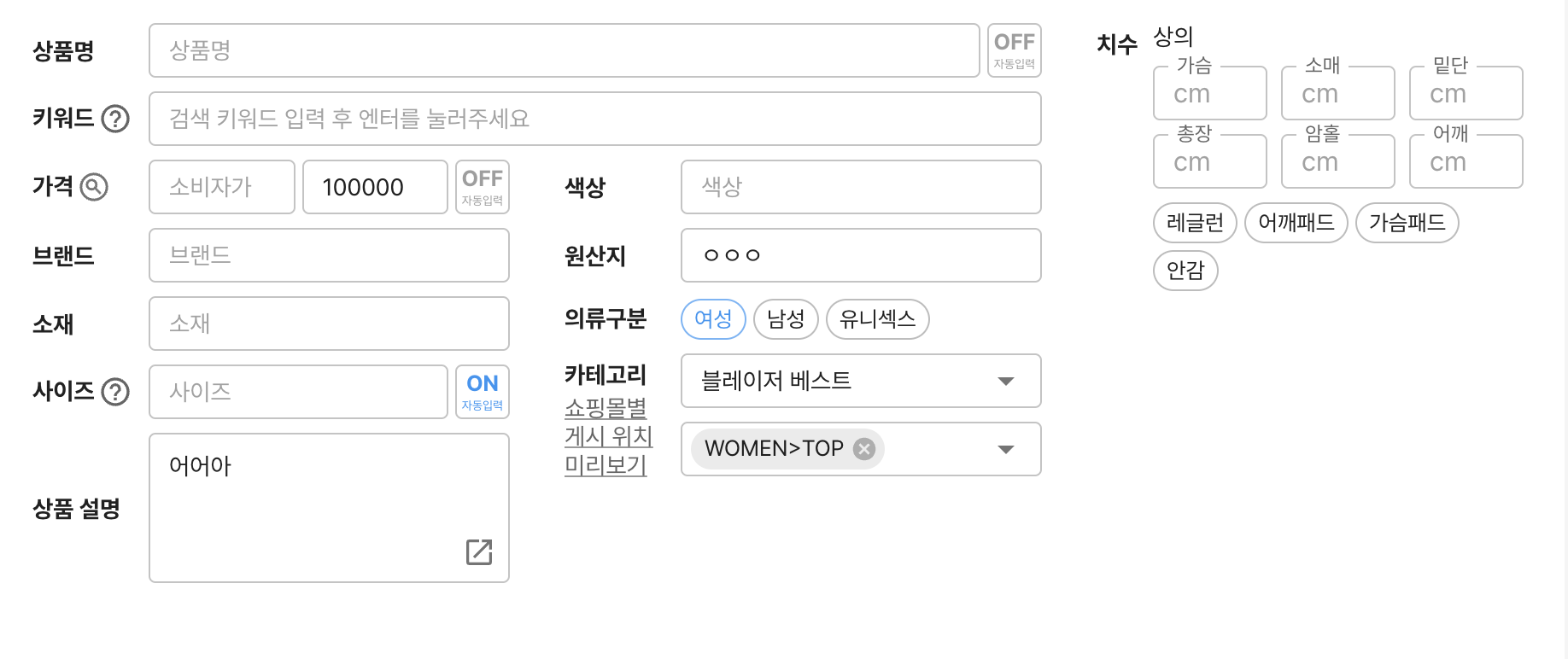
The image above shows filters used on a different screen.
Let's assume 상품코드, 상품명, and 카테고리 (product code, product name, category) are all already present in CancleOrderRequestType.
(Just before deployment)
🥸 (UX Designer): Please add product code, product name, and category filters!
(It's an existing UI, so I just need to grab and insert it, right?)
😾 (Developer): Got it!
**(Hmm... I need to add all the error states!! And connect all the props!!) **
Designers or product managers simply requested to remove or add components, but for us, the task becomes complicated as we have to touch the business logic.
(Just before deployment)
🥸 (UX Designer): Please don't check for errors when values change; instead, check the error status when the search button is clicked!
(Is it difficult? Will it be simple? It should be simple, right?)
😾 (Developer): That's not possible right now.
(I need to check all error validation functions when the search button is clicked and then update the error state. There's no easy way.)
Let's consider bringing the validation functions that were being handled inside each filter.
It would be even more terrible when removing or adding filter components, as experienced above.
The logic would become increasingly complex, for example, by creating custom hooks for validation.
It's very common in practice for development complexity to be high, contrary to what designers or product managers might think. It's unavoidable.
But is it unavoidable even in this situation?
In the world of react-hook-form, absolutely not.
- After Adoption
const Container = React.memo(function Container() {
  const methods = useForm<CancleOrderRequestType>({mode: 'all'});

  const disabled = Object.keys(methods.formState.errors).length > 0;

  return (
    <VStack gap={1} width={'100%'}>
      <form
        onSubmit={methods.handleSubmit(v => {
          // 데이터 핸들링
        })}
      >
        <FormProvider {...methods}>
         <Filter.기간 />
      	 <Filter.취소승인여부 />
	     <Filter.플랫폼 />

         <Button type={'submit'} disabled={disabled} onClick={() => {
                //... state 핸들링
            }}>
            검색
         </Button>
        </FormProvider>
      </form>
    </VStack>
  );
});
The code has become really clean, hasn't it?
Let's apply the scenario we encountered earlier.
🥸 (UX Designer): Please remove the platform filter and add product code, product name, and category filters!
const Container = React.memo(function Container() {
  const methods = useForm<CancleOrderRequestType>({mode: 'all'});

  const disabled = Object.keys(methods.formState.errors).length > 0;

  return (
    <VStack gap={1} width={'100%'}>
      <form
        onSubmit={methods.handleSubmit(v => {
          // 데이터 핸들링
        })}
      >
        <FormProvider {...methods}>
         <Filter.기간 />
      	 <Filter.취소승인여부 />
         <Filter.상품코드 />
         <Filter.상품명 />
         <Filter.카테고리 />

         <Button type={'submit'} disabled={disabled} onClick={() => {
                //... state 핸들링
            }}>
            검색
         </Button>
        </FormProvider>
      </form>
    </VStack>
  );
});
😾 (Developer): Got it! (There's nothing to explain. I just removed and added them.)
Each filter component internally manages react-hook-form's formState using rules.
The parent component doesn't need to care what children it has.
Now, let's look at the case where we modified the validation location.
(Just before deployment)
🥸 (UX Designer): Please don't check for errors when values change; instead, check the error status when the search button is clicked!
(Is it difficult? Will it be simple? It should be simple, right?)
const methods = useForm<CancleOrderRequestType>({mode: 'onSubmit'}); //onSubmit 외에도 blur touch 등 다양하게 제어 가능
😾 (Developer): Got it!
(There's nothing to explain. I just changed themode.)
What Problems Were Solved?
1. Reduced Code Fragmentation
By not using store, context, atom, etc., code fragmentation was minimized. (The example code above used props, but this also applies to cases using store and context.)
2. Separation of Concerns Code modifications in other places were eliminated, regardless of whether other components were removed or added.
3. Eliminated Unnecessary Rerenders It optimizes rendering by being composed of uncontrolled components.
4. Increased Maintainability With a significant reduction in code, understanding the logic became much easier during code reviews or when revisiting the code.
Conclusion
react-hook-form is a fantastic library that can handle all form-related scenarios in react and react-native.
At our company, we are writing maintainable code for both our app and web using react-hook-form.
Although I've only explained basic features here, it has many functionalities and can be used in all scenarios where JSON data is generated through events.
This concludes my introduction to the problems we solved by directly adopting react-hook-form at our company.
Thank you!