
JavaScript is a single-threaded language, and it can prevent blocking issues from long-running tasks by processing them with asynchronous functions.
I had a question: if JavaScript is single-threaded, where are asynchronous tasks handled, and how are they managed?
One of the answers to that question is this topic: the Event Loop.
Event Loop Components
Before understanding how the Event Loop operates, it's necessary to understand each of the components it manages. (Image Source)
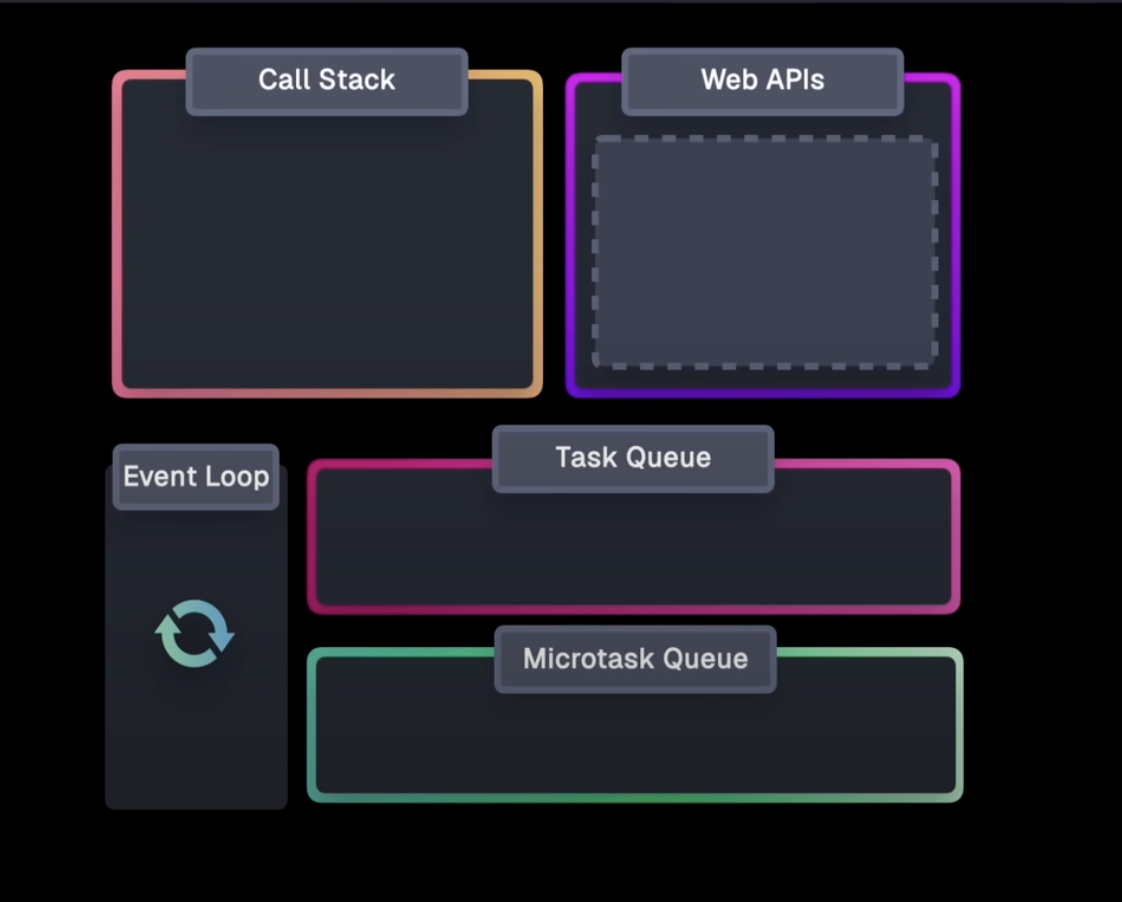
Call Stack
The Call Stack manages the execution context of a JavaScript program. When a function is executed, it is pushed onto the Call Stack, creating an execution context.
This is where common JavaScript functions like console.log() are pushed and consumed.
Web APIs
These are APIs provided by the browser, used to interact with features utilized by the browser. Some provide asynchronous operations in the background, and these asynchronous tasks are executed by the browser itself.
Today, we will take a closer look at the asynchronous Web APIs necessary for explaining the Event Loop.
Asynchronous functions in Web APIs primarily come in two types.
1. Web APIs that execute callbacks
A prime example is the setTimeout function.
setTimeout(() => {
  console.log('2000ms');
},100);
Taking the setTimeout function as an example, the browser will asynchronously manage the 100ms duration, and after 100ms, it will move the callback to be executed by the JavaScript engine.
For execution by the JavaScript engine, it must enter the Call Stack. However, if asynchronous functions continuously enter the Call Stack directly, conflicts would arise.
To prevent this, there is a Task Queue, and the callback provided to setTimeout is configured to move to the Task Queue after 100ms.
The Task Queue will be explained later.
2. Web APIs that return Promises
Most modern Web APIs provide a mechanism that returns a Promise.
A prime example is the fetch API.
fetch("...")
  .then(data => console.log(data))
  .catch(error => console.error(error));
In the case of this Web API, after the function is executed in the browser, then, catch, etc., are moved to be executed by the JavaScript engine.
Promises are configured to move to the Microtask Queue, which is slightly different from callback-based Web APIs.
Task Queue
This is a queue where Web API callbacks and event handlers are stored.
(It is also referred to as the Callback Queue because Web API callbacks are placed there.)
Its purpose is that when the Call Stack is empty, the Event Loop moves tasks from the Task Queue to the Call Stack for execution.
(setTimeout, setInterval, etc.)
Microtask Queue
This is a queue where callbacks for Promises, async await, MutationObserver, etc., are stored.
The Microtask Queue is the highest priority queue, which the Event Loop consumes before the Task Queue if the Call Stack is empty. (Executed even before rendering)
(Promise.then, catch, finally, fetch, etc.)
Event Loop Operation Process
Now, let's return to the main topic and examine the Event Loop.
Basic Operation
The Event Loop's role is to move tasks from the queues described above to the Call Stack. (Function execution is handled by the JavaScript engine and the browser.)
The Event Loop continuously runs a loop, checking if the Call Stack is empty.
If the Call Stack becomes empty during the loop, it determines that there are no ongoing tasks and moves the oldest executable function from the Microtask Queue or Task Queue (Microtask Queue has higher priority) to the Call Stack.
The Event Loop continuously repeats the process described above.
The code below is a rough implementation using JavaScript to help understand the process.
while(true){
  if(!콜스택이_비어있는가){
    return;
  }

  if(마이크로_태스크큐_대기중인_작업이_있는가){
    콜스택에_마이크로_태스크큐_작업_넣기();
    return;
  }

  render()

  if(태스크큐_대기중인_작업이_있는가){
    콜스택에_태스크큐_작업_넣기();
    return;
  }
}
Task Queue Operation Process
It was stated that callback-based asynchronous Web APIs are managed in the Task Queue.
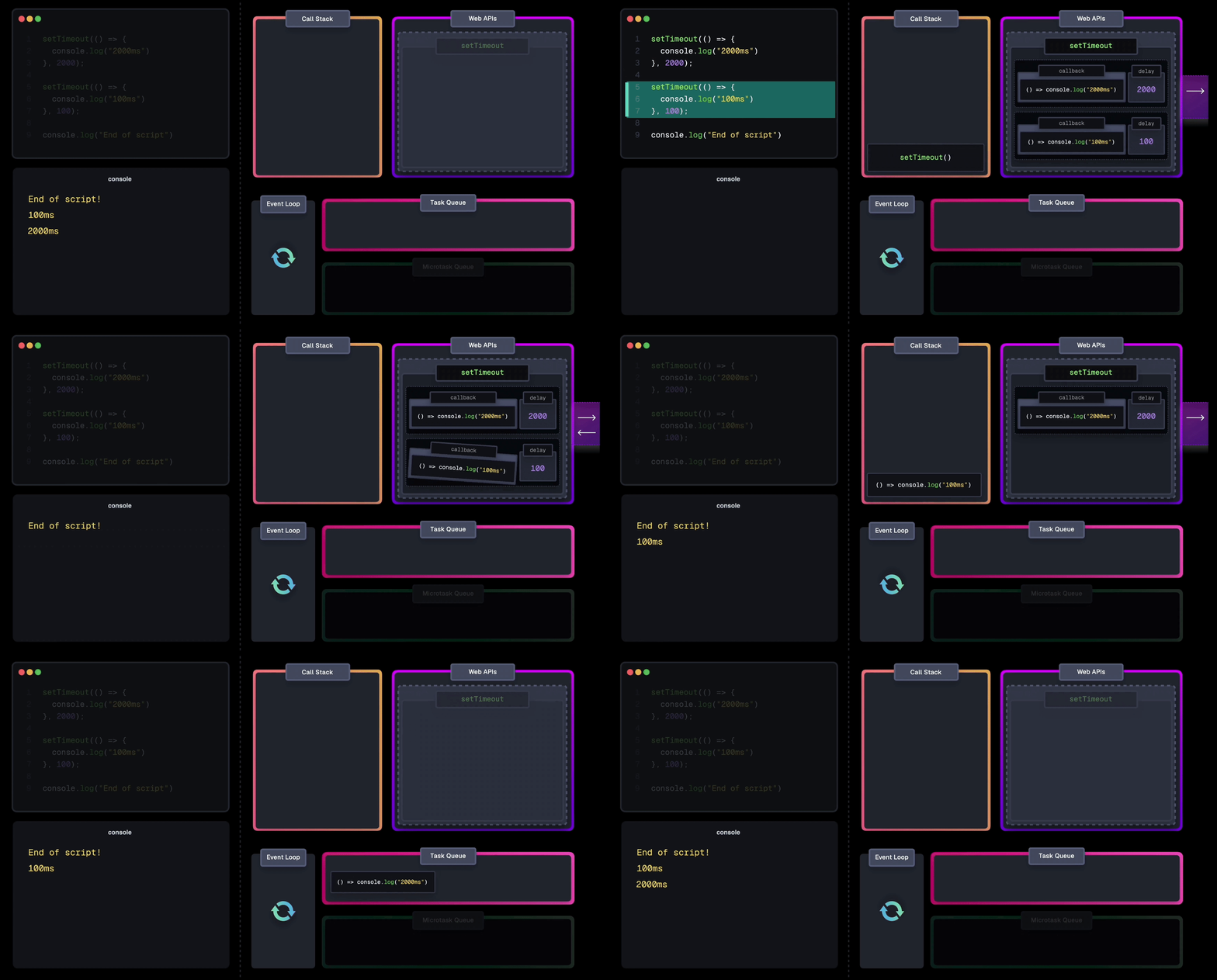
Let's examine this process in more detail using setTimeout code.
setTimeout(() => {
  console.log('2000ms');
},2000);

setTimeout(() => {
  console.log('100ms');
},100);

console.log('end');
According to the Event Loop explanation above, the following process will occur:
- The
setTimeoutfunction is called and pushed onto the Call Stack. - The callback function is passed to the Timer Web API, and the browser counts 2000ms.
- The
setTimeoutfunction is removed from the Call Stack. - The
setTimeoutfunction is called and pushed onto the Call Stack. - The callback function is passed to the Timer Web API, and the browser counts 100ms.
- The
setTimeoutfunction is removed from the Call Stack. console.log('end')is pushed onto the Call Stack.console.log('end')is removed from the Call Stack.- The 100ms callback moves to the Call Stack.
console.log('100ms');is pushed onto the Call Stack.console.log('100ms');is removed from the Call Stack.- The 2000ms callback is removed from the Call Stack.
- The 100ms callback moves to the Call Stack.
console.log('2000ms');is pushed onto the Call Stack.console.log('2000ms');is removed from the Call Stack.- The 2000ms callback is removed from the Call Stack.
Here's a good GIF explaining this process (Source)
Microtask Queue Operation Process
The Microtask Queue operates in the same way as the Task Queue. The difference is that, as explained above, the Event Loop processes it with the highest priority.
Again, here's a good GIF explaining this process (Source)
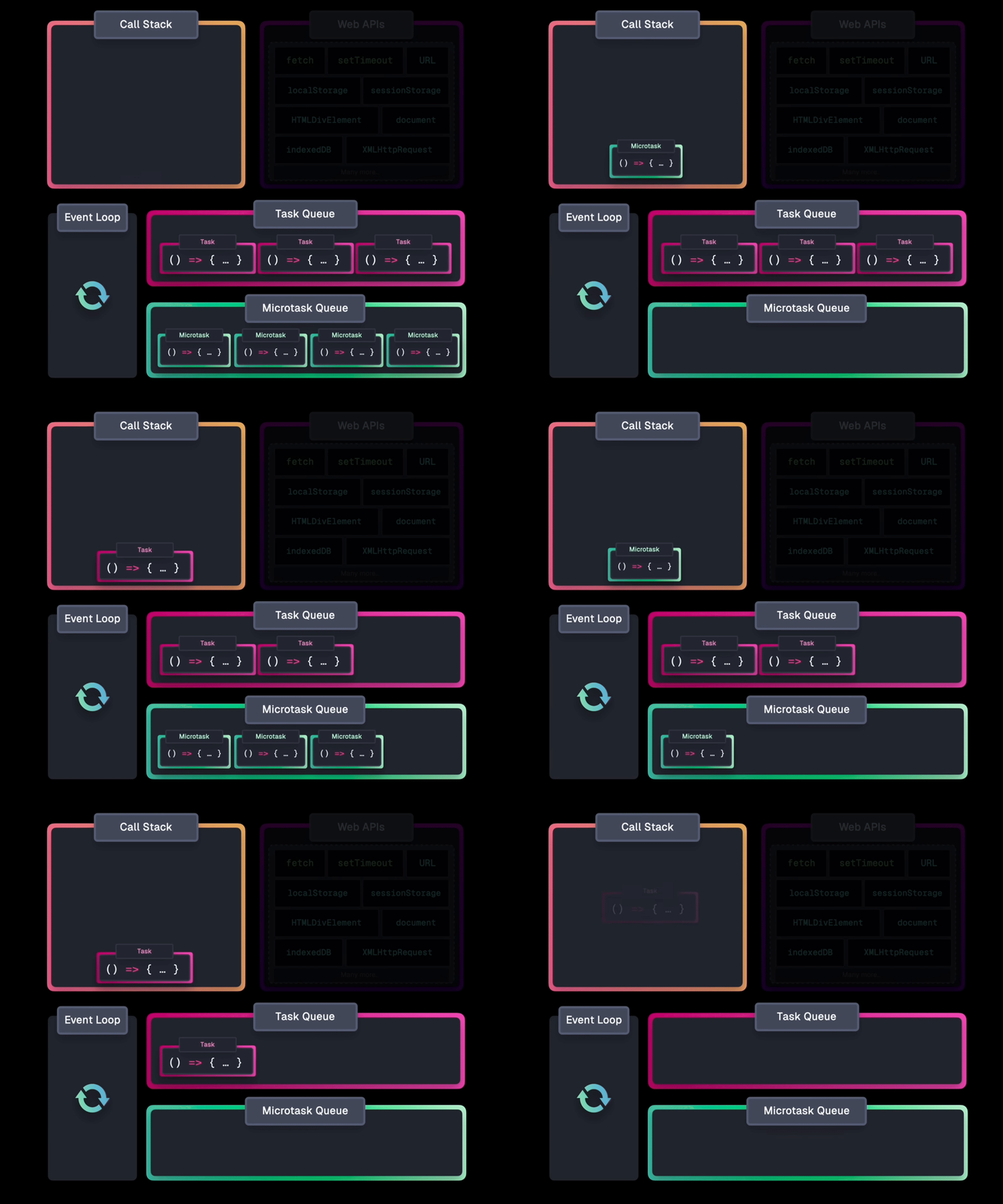
It's important to note that since these tasks have higher priority than rendering, if too many tasks accumulate in the Microtask Queue, rendering itself might halt.
Summary
- JavaScript's asynchronous processing is managed by the browser's Event Loop.
- Web APIs provide both callback-based asynchronous functions and Promise-based asynchronous functions.
- Callback-based asynchronous functions accumulate in the Task Queue, while Promise-based asynchronous functions accumulate in the Microtask Queue.
- If the Call Stack is empty, the Event Loop moves tasks from the Microtask Queue or Task Queue to the Call Stack, managing asynchronous operations.
- The Event Loop literally loops infinitely, repeating this operation.
Conclusion
We have thoroughly examined the operation of the JavaScript Event Loop up to this point. If there are any inaccuracies, please feel free to provide feedback in the comments.
Thank you.
References
lydiahallie's Explanation of the Event Loop