
0. Background of Exploration
Both at my company and on this blog, we use React Router v7. So, I only knew React Server Components (RSC) as "that thing in Next.js App Router."
However, there were continuous discussions about slow app loading. When performance comes up, the phrase "using server components reduces bundle size" naturally follows. But is that really true? Is the slowness we experience the kind that RSC can alleviate?
This article started from that question. We'll examine what problems SSR left behind and how RSC addressed them differently, what exactly the RSC payload sent by the server is, and how Server Functions operate in the opposite direction, in sequence. When examples are needed, I'll borrow from this blog's post pages.
1. What SSR Solved and What It Left Behind
We often hear explanations like "using RSC improves SEO and speeds up initial loading." However, these are things we already achieve with SSR. To understand why RSC emerged, we need to see how far SSR went in solving problems.
How SSR Works
SSR (Server-Side Rendering) is a method where React components are executed on the server to first generate and send HTML, and then the same components are re-executed in the browser to create a live application. Next.js Pages Router, Remix, and React Router Framework Mode all follow this structure. A single page request typically flows like this:
There are three key points in the diagram:
- ① Components are rendered synchronously, so necessary data is collected beforehand. This is why frameworks have a data layer outside of components, such as
loaderorgetServerSideProps. - ③ For the browser to hydrate, it must render with the exact same data as the server to ensure consistency. Therefore, the data fetched in ① is embedded as JSON within the HTML.
- ⑤~⑥ Hydration requires all component code that makes up the page, including libraries imported by those components.
hydrateRootre-executes the entire tree with this code, attaches event handlers to the existing DOM, and blocks the main thread during this process.
In code, it looks like this:
// 서버
const data = await loader(request);
const html = renderToString(<App data={data} />);
res.send(`
  <div id="root">${html}</div>
  <script>window.__DATA__ = ${JSON.stringify(data)}</script>
  <script src="/bundle.js"></script>
`);

// 브라우저 (bundle.js)
hydrateRoot(document.getElementById("root"), <App data={window.__DATA__} />);
SSR's HTML is Not a Finished Product
Server rendering in the days of JSP or PHP produced HTML that was a finished product. The browser simply displayed it, and separate scripts handled interactions.
Modern SSR is different. The core of the application is still a client-side React app, and the HTML sent by the server is a snapshot that pre-renders the first screen. The app only becomes interactive after the JS arrives and the same component tree takes over (hydrates) that HTML.
Therefore, modern SSR is less of a "server-rendered app" and more of an initial screen optimization for CSR apps.
Costs Left by SSR
The limitations of this structure are clear:
- Bundle size does not decrease. Even static content like blog post bodies, product descriptions, and footers, which never change after being rendered once, are sent as JS and hydrated. Markdown parsers or date formatting libraries, which only require their output, also go along.
- Data is sent twice. Once within the HTML, and again as serialized data for hydration.
- Data requirements are hoisted to the route level. Data needed by deeply nested components must be collected beforehand in
loaderorgetServerSidePropsand passed down as props. This separates components from the data they use. - The client re-executes what the server has already rendered. Even parts that will never change.
SSR was merely an optimization to display the first screen quickly, but it did not reduce the costs borne by the client itself.
2. RSC Changed the Question
The React team changed the question. Instead of asking whether to render the first screen on the server, they asked: Does this component even need to go to the client?
The answer, unveiled in December 2020 as "Zero-Bundle-Size React Server Components," is as follows:
- Components without interaction execute only on the server and send only the result. Their code and dependencies are not included in the bundle and are not re-executed on the client.
- Components fetch data directly. There's no need to centralize data requirements at the route level.
- The result is delivered not as HTML, but as an RSC payload, which is merged into the live React tree. This allows the client state to be preserved while receiving server results, even when navigating between pages.
Not in Competition with SSR
It's often misunderstood that server components replace SSR. The two answer different questions.
| SSR | Server Components | |
|---|---|---|
| Question Addressed | Where to build the initial HTML? | Where to execute this component? |
| Application Timing | Initial Request | Initial Request + Subsequent Navigation |
| Output | HTML | RSC payload |
| Component Code | All goes to client | Server components do not go |
| Hydration | Entire tree | Client components only |
In practice, Next.js App Router uses both. Server components create the payload, and SSR uses that payload to build the initial HTML. Client components are also SSR'd on the initial request.
RSC from the Perspective of a Blog Post Page
I've assumed this blog's post page is composed of the following components:
| Component | Function | Interaction |
|---|---|---|
Layout, PostHeader, Footer |
Static markup like title, date, tags | None |
Article |
Convert Markdown to HTML (unified, remark, rehype, highlighter) | None |
Nav |
Menu, language switch | Yes |
ReadingProgress |
Update progress bar based on scroll | Yes |
Comments |
Comment widget | Yes |
Server components execute only on the server, and the browser receives only their result (RSC payload). With SSR, the Markdown library would have been included in the bundle. In theory, since that library doesn't go to the client, bundle size is reduced, and only Article and the rest need hydration, speeding up the time to interactive. However, this assumes Markdown conversion was originally in the client bundle. If it was already running only on the server, there's nothing to reduce. We'll revisit this point in the conclusion.
In short, SSR optimized "when to show," while RSC optimizes "what to send."
3. CSR / SSR / RSC — What's Different?
I compared the three approaches on the same timeline.
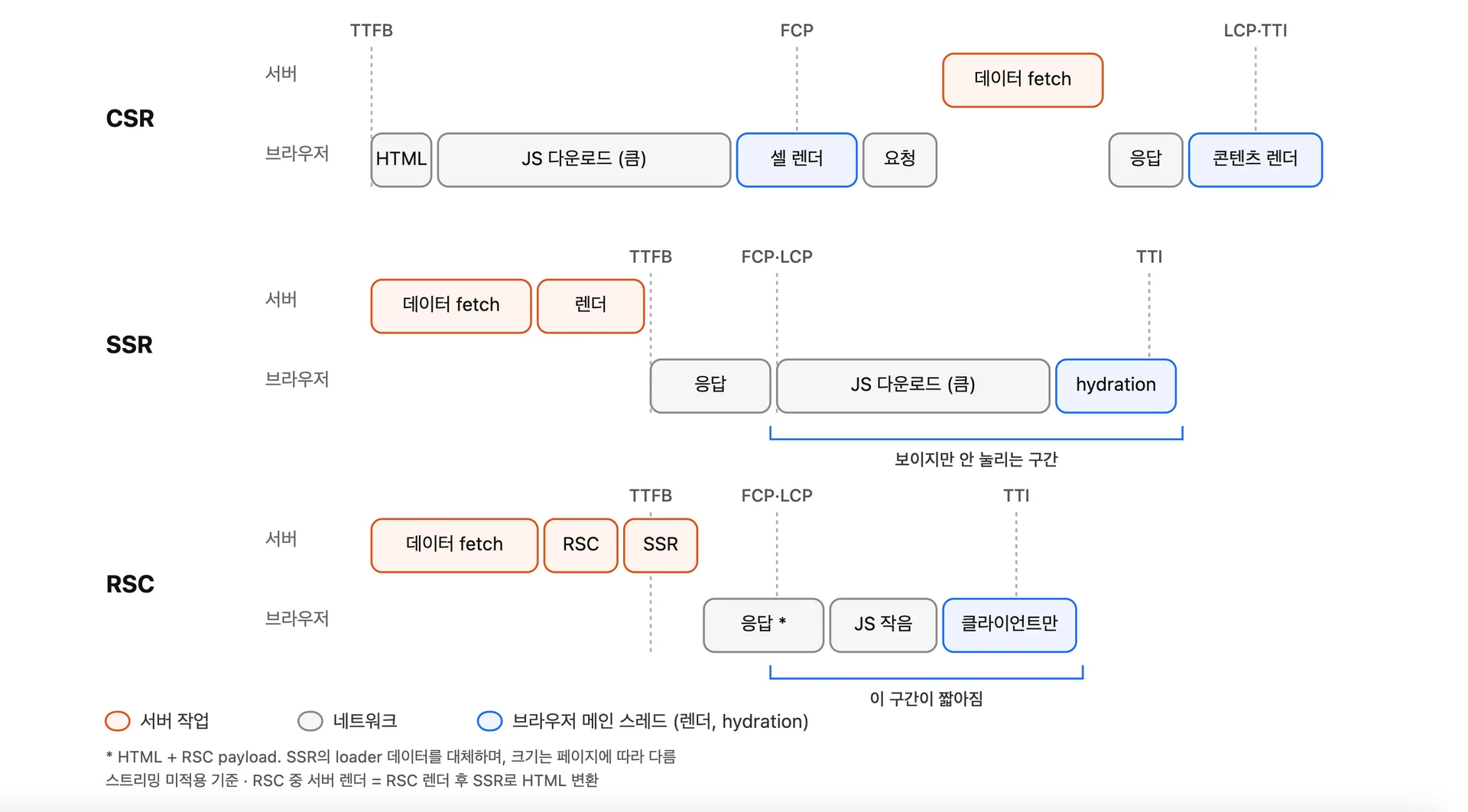
- CSR: Receives an empty HTML, downloads and executes JS, and only then does the browser request data from the API. This adds another round trip, making content visible the latest.
- SSR: Fetches data on the server and generates HTML, so content appears quickly. However, it requires downloading the entire app's JS and hydrating the entire tree before it becomes interactive. This "visible but not interactive" period is the cost of SSR.
- RSC: Data fetching location and response time are the same as SSR. The difference lies afterward. Server components are excluded from the bundle and hydration target, shortening that period.
| Metric | CSR | SSR | RSC |
|---|---|---|---|
| TTFB | Fast (empty HTML) | Delayed by server work | Same as SSR or slightly slower |
| FCP · LCP | Slow | Fast | Same as SSR |
| TBT · INP during loading | As much as bundle execution | Bundle + full hydration | As much as client components |
Looking only at what goes over the network:
| What goes over the network | |
|---|---|
| CSR | Empty HTML + entire app JS + JSON |
| SSR | HTML + entire app JS + serialized data |
| SSR + RSC | HTML + RSC payload + client component JS only |
SSR speeds up "visible speed" (FCP, LCP), and RSC adds "usable speed" (TBT, INP) to this. However, the effect only occurs to the extent that components are moved to the server, and response size can be larger or smaller than SSR depending on the data format.
4. What is RSC payload?
When explaining RSC, the RSC payload is constantly mentioned. Simply put, it's data that represents the entire UI tree. So, why does RSC need a UI Tree generated on the server?
SSR hydration
Hydration is the process of re-executing React code directly on top of the HTML generated by the server.
It's a recursive process, hydrating each element object from the Root.
hydrateRoot(root, <App data={window.__DATA__} />)
//                 ↑ { type: App, props: {...} } — Function
Executing App yields ProductPage, which is also a function, so it's executed again, and so on, traversing the function branches all the way down. This is why all component code making up the page must be in the bundle.
However, the goal of server components is not to send code to the client. Even to hydrate only client components, React needs to know where they are in the tree and what their siblings are to match them with the DOM.
Therefore, the server sends the entire tree's structure as data. That is the RSC payload.
0:["$","div",null,{"children":[["$","h1",null,{"children":"Async Component"}],["$","$1",null,{"fallback":["$","p",null,{"children":"Loading..."}],"children":"$L2"}]]}]
Why was a new format (Flight) needed?
Even when trying to represent React's tree structure, existing data formats couldn't accommodate it.
//jsx
<main>
  <h1>RSC 탐구기</h1>
  <p>본문</p>
</main>

//컴파일된 형태
{
  type: "main",
  props: {
    children: [
      { type: "h1", props: { children: "RSC 탐구기" } },
      { type: "p",  props: { children: "본문" } },
    ],
  },
}
The example above shows that the UI tree itself is a data tree that can be expressed in JSON. However, sending React's Tree structure over a network request presents two problems.
1. A function can appear in the type field.
<Counter initial={0} />
// → { type: Counter, props: { initial: 0 } }
//          ↑ The function itself, not a string
HTML tags like "h1" are strings, so they're fine. But components are functions, and functions cannot be serialized to JSON.
So, instead of the function, RSC sends only which module and which export it is. In the actual payload, it looks like this:
1:I["/src/counter.tsx",["/assets/counter.js"],"Counter"]
0:["$","$L1",null,{"initial":0}]
2. Asynchronous components are mixed in.
Server components can be async. If a comment lookup takes 3 seconds, that tree will only be complete after 3 seconds. JSON must be a complete string to be JSON.parsed, so even if everything else is ready, you have to wait 3 seconds.
To send a UI tree, two things must be added to JSON:
| What's needed | JSON | RSC payload |
|---|---|---|
| Nested UI structure | O | O |
| Pointing to client components | X (function serialization impossible) | Module reference (I row) |
| Sending unfinished parts first | X (must be complete to parse) | Placeholder + later row |
The solution to the first problem is the module reference we just saw, and the solution to the second problem will be discussed later.
The official name for this format is Flight. It's the name used internally within the React repo and is implemented in the
react-serverandreact-clientpackages. It's an implementation detail, not a public specification, so it may change between versions.The "RSC payload" used in Next.js documentation refers to the serialized output in this format. At the HTTP level, it's sent with
Content-Type: text/x-component.
Streaming
Streaming is an indispensable concept when explaining RSC.
Streaming is a method that allows UI to be progressively rendered from the server, expressed as chunked in the HTTP response transfer-Encoding.
While streaming techniques ultimately involve progressively fetching and completing data, it's worth thinking a bit deeper about how to stream the UI tree.
Dan Abramov's article Progressive JSON kindly explains how objects can be streamed based on the JSON format.
Dan Abramov's "Progressive JSON" is not a separate format but a name given to explain the same thing. The article progressively derives Flight's serialization strategy starting from ordinary JSON, and finally reveals that this is essentially how RSC works. However, the scope of the article covers only the serialization strategy, and the module references seen above are added on top of that.
Without streaming, if a comment lookup takes 3 seconds, even the already prepared header and footer would have to wait 3 seconds.
So, if streaming is applied to simply send sequentially from top to bottom, the completeness of JSON becomes an issue (the same applies if streaming HTML).
// t=0s, 서버가 보낼 수 있는 만큼 보냈다
{"header":"Welcome to my blog","post":{"content":"This is my article","comments":
The bracket is not closed, and putting it into JSON.parse would result in a SyntaxError. Each fragment is not a complete value in itself, so the receiver cannot do anything. It's no different from waiting for everything to arrive.
Even if a custom parser were used, a more fundamental problem remains: there's no way to distinguish whether an empty comments field means "no value exists" or "value hasn't arrived yet." The format lacks a way to express "not yet."
Therefore, the unit of splitting is changed. Instead of cutting a monolithic JSON in the middle, it's divided into individually complete fragments (rows) from the start, and unknown parts are explicitly marked with placeholders.
// 첫 번째 행 (루트)
{ header: "$1", post: "$2", footer: "$3" }
/* $1 */ "Welcome to my blog"
/* $3 */ "Hope you like it"
/* $2 */ { content: "$4", comments: "$5" }
/* $4 */ "This is my article"
/* $5 */ ["$6", "$7"]
/* $6 */ "First comment"
/* $7 */ "Second comment"
Sending data this way changes things:
- Each row is a complete JSON in itself. There are no half-arrived rows. When a row arrives, it can be
JSON.parsed immediately. - Unknown parts are explicitly "not yet arrived."
"$2"is a promise that it will arrive later, so there's no confusion with missing data. - Rows arrive in any order as they become ready. In the example above,
$3(footer) arrived before$2(post). Slow comments do not block the footer.
The /* $1 */ might look like a separate chunk, making it easy to read as if another request is sent or the server re-executes to receive later rows.
Neither is true. One request, one execution, and one response. The placeholder marks a part that hasn't finished in that single execution, and later rows are the results of the same execution continuing. The server keeps the response open and writes to the same stream. The response ends when all remaining placeholders are filled.
When the receiver encounters "$2", it inserts a pending Promise in that spot, and resolves it when the $2 row arrives later.
// 첫 행만 받은 시점
{
  header: "Welcome to my blog",
  post: Promise<pending>,
  footer: "Hope you like it",
}

// $2 행까지 받은 시점
{
  header: "Welcome to my blog",
  post: { content: "This is my article", comments: Promise<pending> },
  footer: "Hope you like it",
}
With this method, types don't lie. post is not an incomplete object but a Promise that hasn't resolved yet. The code can await it or use use().
The RSC payload applies this method to the UI tree. The module references seen earlier are added to this. The actual response looks like this:
1:I["/src/client-tabs.tsx",["/assets/client-tabs.js"],"ClientTabs"]
0:["$","main",null,{"children":[["$","h1",null,{"children":"Welcome"}],["$","$L1",null,{"children":"$L2"}]]}]
2:["$","article",null,{"children":"본문..."}]
What's included in the RSC payload
As seen above, the payload's role is to tell the client "what is where" so it can reconstruct the tree. Therefore, what's included are the contents necessary for that reconstruction:
- Execution results of server components
- Functions disappear, leaving only the returned host elements (
article,h1…)
- Functions disappear, leaving only the returned host elements (
- Placeholders for client components
- Marked by placeholders (
$L1)
- Marked by placeholders (
- What to put in those placeholders
- Module references (
Irow). Which chunk and which export.
- Module references (
- Props to pass to that component
- Values crossing from server to client must be serializable.
Frameworks add their own information to this. For Next.js, this might include router state or resource preload hints.
These four points also explain the difference between
childrenandimport. A server component passed aschildrento a client component has already finished execution, so only its result is written, unrelated to the bundle. Conversely, if a client fileimports it, that module goes into the client bundle. At that moment, it becomes a client component and is written as anIrow, which requires caution.
Dan Abramov's RSC Explorer shows server code and its corresponding Flight output side-by-side. I've summarized a set of examples.
1. Client Component
import { Counter } from './client'

export default function App() {
  return (
    <div>
      <h1>Counter</h1>
      <Counter initialCount={0} />
    </div>
  )
}
1:I["client",[],"Counter"]
0:["$","div",null,{"children":[["$","h1",null,{"children":"Counter"}],["$","$L1",null,{"initialCount":0}]]}]
h1is the result of server-side execution, so its content is included directly.Counteris included as a reference1:I["client",[],"Counter"]instead of code. This means "fetch the Counter export from the client module."- In the tree,
"$L1"points to that location, and{"initialCount":0}are the props to pass.
2. async Component + Suspense
export default function App() {
  return (
    <div>
      <h1>Async Component</h1>
      <Suspense fallback={<p>Loading...</p>}>
        <SlowComponent />
      </Suspense>
    </div>
  )
}

async function SlowComponent() {
  await new Promise(r => setTimeout(r, 500))
  return <p>Data loaded!</p>
}
1:"$Sreact.suspense"
0:["$","div",null,{"children":[["$","h1",null,{"children":"Async Component"}],["$","$1",null,{"fallback":["$","p",null,{"children":"Loading..."}],"children":"$L2"}]]}]
2:["$","p",null,{"children":"Data loaded!"}]
- Row
1:is a React built-in symbol forSuspense, and"$1"in the tree uses that value directly. "$L2"is a hole pointing to row 2. Row 0 goes out first, and row 2 arrives 500ms later.- During that time, the client shows the
fallback.
The difference between $1 and $L2 becomes apparent here. Both point to rows, but $L implies "may not have arrived yet."
3. Server Function — Reverse Direction Reference
import { Form } from './client'

export default function App() {
  return (
    <div>
      <h1>Form Action</h1>
      <Form greetAction={greet} />
    </div>
  )
}

async function greet(prevState, formData) {
  'use server'
  const name = formData.get('name')
  return { message: `Hello, ${name}!`, error: null }
}
1:I["client",[],"Form"]
2:{"id":"greet#greet","bound":null}
0:["$","div",null,{"children":[["$","h1",null,{"children":"Form Action"}],["$","$L1",null,{"greetAction":"$h2"}]]}]
- Row
2:is a server function reference. It contains only the identifier (greet#greet), not the function body. "$h2"in the props points to that row. The client revives this as "a function that sends a request to the server when called."- If the
Irow is "the server pointing to client code," this is the opposite direction.
Side-by-side with SSR:
| SSR | RSC | |
|---|---|---|
| What the server sends | Data (ingredients) | Tree (result) |
| What the client does | Re-executes everything to create tree | Creates tree from payload + executes client components only |
HTTP/2 reduced the cost of streaming
Streaming itself is possible with
Transfer-Encoding: chunkedin HTTP/1.1. The problem is that one connection handles only one response at a time. An HTML stream open for 3 seconds holds one of the approximately 6 connections per domain, causing JS, CSS, and image requests to queue up.HTTP/2 breaks messages into frames and attaches a stream ID to each frame, allowing multiple requests and responses to be interleaved over a single connection (multiplexing). If the browser requests JS after seeing
<link rel="modulepreload">sent in the early part of the document by the server, the JS is received first over the same connection where the HTML stream is open.
5. The Opposite Direction: Server Function
So far, we've only looked at the server → client direction. The payload was created on the server and went to the browser, which decoded it. A Server Function is when that direction is reversed.
We already saw its place in Example 3 of Chapter 4.
2:{"id":"greet#greet","bound":null}
0:[..., ["$","$L1",null,{"greetAction":"$h2"}]]
A function marked with 'use server' is carried in the payload not as its body, but as an identifier (greet#greet). The $h2 in the props points to that row. The server function, in essence, sends an address instead of code.
Reviving the Address as a "Calling Function"
When the browser encounters $h2, React revives it as a shell that looks like a normal async function. From the perspective of the receiving Form component, it simply received an async function as a prop. But the body of that function resides only on the server, and the shell does one thing: when called, it sends a request to the server.
// React가 $h 참조로부터 만들어주는 것 (개념)
async function greet(...args) {
  return fetch(현재경로, {
    method: "POST",
    headers: { "Next-Action": "greet#greet" },   // Which function
    body: Flight로_인코딩(args),                   // Arguments encoded with Flight
  })
}
What was received was only a phone number (address) and a "phone that connects when pressed," not the other party itself.
Call: Arguments go via Flight, Server Decodes
Calling greet(formData) sends a POST request. Looking into this request:
- The address is in the header (
Next-Action), and the arguments are in the body. They are in different places. - The arguments are encoded with Flight, not JSON. This allows
Date,Map,File, etc., to be passed as-is.
The server processes the received request in this order:
In Chapter 4, the browser decoded, but in this direction, the server decodes. This is why decoders exist on both sides. React implements these as ReactFlightClient (server → client) and FlightReplyServer (client → server), respectively.
In December 2025, a critical vulnerability (CVE-2025-55182, CVSS 10.0) was discovered in this Server Function path. It allowed arbitrary code execution on the server with a single HTTP request without authentication.
The structure reveals why it was bound to happen. In the rendering direction, the server is the one creating the payload, so it handles what it created. However, in the Server Function direction, the server is the one restoring a payload that came from outside. And there's no guarantee that the sender of the request is a genuine React client — a manipulated body can be sent via
curl.The React core patch (PR #35277) directly shows the cause. It stated that "
FlightReplyServer(client → server) andReactFlightClient(server → client) were not 100% symmetrical," and that protection already present in the rendering direction decoder was ** belatedly moved to the opposite direction decoder** to fix the issue. In other words, the defense that was present on the browser's receiving end was missing on the server's receiving end.
6. Conclusion — RSC is Not the Silver Bullet
This article started from a question about the flow: "App is slow → Bundle is large → Let's reduce with RSC." Upon examination, this flow only holds true when the cause of slowness lies within the bundle. Checking with this blog, that wasn't the case. Server-only code like Markdown conversion was already separated into .server.ts modules and outside the bundle. In fact, turning on RSC didn't reduce the initial load JS; it increased by 4KB. The biggest cost, it turned out, was in places not visible until measured, like 3MB of fonts.
The lesson from TanStack's article (Original) about adopting and then removing RSC from tanstack.com is the same. Finding the actual bottleneck is paramount; covering up problems by changing architecture is not good. Most of their improvements came from "the renderer is too heavy," not RSC, and once the renderer was made lighter, RSC no longer justified its cost.
RSC is undoubtedly a well-designed, next-generation architecture. However, for apps like our blog, whose purpose is simply "to hide server-only modules from the client," SSR, which sends HTML generated on the server, might be sufficient. This is even more true if hydration is not strictly necessary. The decision to use RSC should be made after first measuring "what kind of slowness our app experiences," not based on "is RSC good?"
References
- Progressive JSON — overreacted
- Static as a Server — overreacted
- Introducing RSC Explorer — overreacted
- Server Components — React 공식 문서 ("Server Components without a Server" section)
- Server and Client Components — Next.js ("On the client (first load)" 3단계)
- Static Exports — Next.js
- Why do I need RSC payload for Server Components — next.js Discussion #67499
- React Server Components — React Router
- Critical Security Vulnerability in React Server Components — React 공식 블로그
- New Suspense SSR Architecture in React 18 — reactwg