
Hello. I'm Jindol, a frontend developer. At my company, running actions with GitHub's own runners became overloaded, so I'm writing about how we set up self-hosted runners.
Current Situation
Our existing GitHub runner uses 2 Linux cores.
Even for simple builds, with multiple people submitting PRs, the waiting time becomes too long.
To improve the slow performance, we would have to double the price, but even then, it's unfortunate given the queue-based nature of build runners, regardless of how much performance improves.
Additionally, we are consistently exceeding the free usage time, which results in ongoing additional charges.
Below are the GitHub Actions costs.

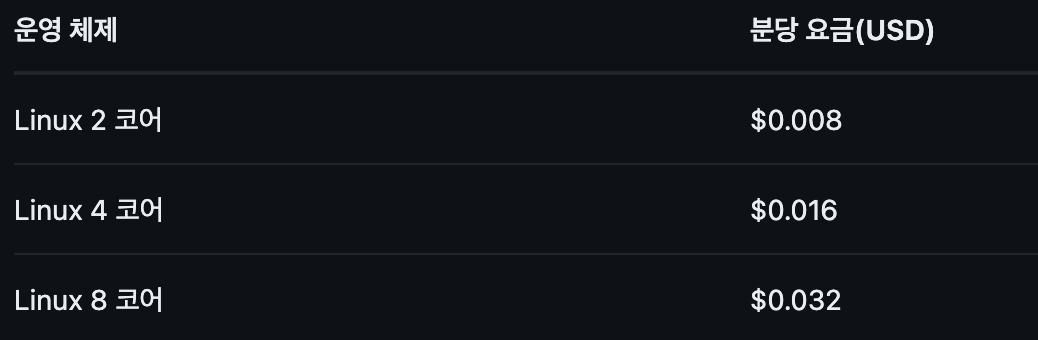
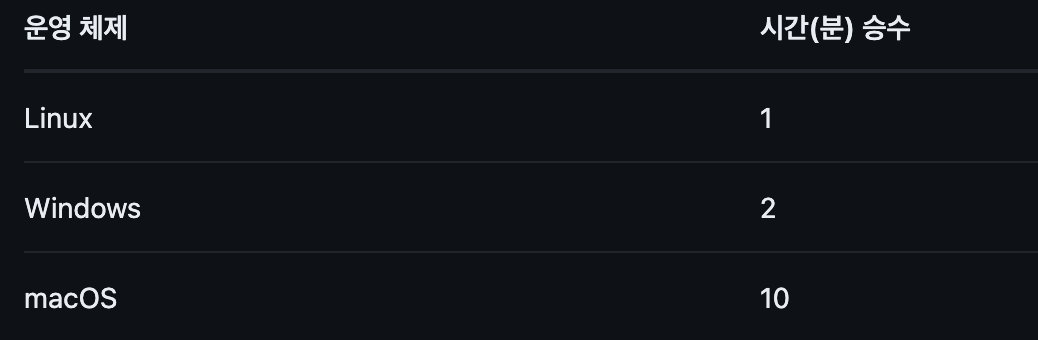
Plan
The plan is as follows:
- Replace idle Windows computers at the company with Linux servers.
- Create a Dockerfile that connects to the GitHub runner.
- Deploy the created GitHub runner by spinning up Docker on the Linux servers.
- Configure multiple self-hosted runners to increase speed and improve satisfaction.
These are the main steps of the plan.
It seems convenient to be able to add runners immediately using a Dockerfile as needed, utilizing idle computers.
Self-Hosted Test
First, before running with Docker, I tested the self-hosted runner creation itself.
If you go to the Runners tab in GitHub Actions, you'll find information on how to add a runner. By following the instructions on GitHub, you can add a runner without any issues.
# Create a folder
$ mkdir actions-runner && cd actions-runnerCopied!# Download the latest runner package
$ curl -o actions-runner-linux-x64-2.317.0.tar.gz -L <https://github.com/actions/runner/releases/download/v2.317.0/actions-runner-linux-x64-2.317.0.tar.gz#> Optional: Validate the hash
$ echo "9e883d210df8c6028aff475475a457d380353f9d01877d51cc01a17b2a91161d  actions-runner-linux-x64-2.317.0.tar.gz" | shasum -a 256 -c# Extract the installer
$ tar xzf ./actions-runner-linux-x64-2.317.0.tar.gz
# Create the runner and start the configuration experience
$ ./config.sh --url <https://github.com/>... --token <Token># Last step, run it!
$ ./run.sh

When running a self-hosted runner in GitHub Actions, you can enable it by adding the labels specified.
jobs:
  job1:
    name: job1
    runs-on: [self-hosted, Linux, test]
If there are multiple identical self-hosted runners, jobs will automatically be handled by an available runner.
Now, we just need to create many runners with Docker and deploy them.
Creating the Dockerfile
Creating the Dockerfile as is would be simple. Let's create it as is.
Creating Exactly as per GitHub's Instructions
I will add a Dockerfile and a shell script to be executed at ENTRYPOINT when the container starts, following GitHub's instructions exactly.
#
./config.sh --url <https://github.com/looko-corp> --token <token>

./run.sh
- dockerfile
FROM ubuntu:22.04

RUN  apt-get clean
RUN  apt-get update

RUN apt-get install --reinstall tar

RUN apt-get update && \\
    apt-get install -y \\
    curl \\
    tar \\
    gzip \\
    jq \\
    git \\
    libicu-dev

RUN  mkdir -p /actions-runner

COPY start.sh /actions-runner/start.sh

RUN chmod +x /actions-runner/start.sh

RUN useradd -m runner

RUN chown -R runner:runner /actions-runner

USER runner
WORKDIR /actions-runner

RUN curl -o actions-runner-linux-x64-2.317.0.tar.gz -L <https://github.com/actions/runner/releases/download/v2.317.0/actions-runner-linux-x64-2.317.0.tar.gz>
RUN echo "9e883d210df8c6028aff475475a457d380353f9d01877d51cc01a17b2a91161d  actions-runner-linux-x64-2.317.0.tar.gz" | shasum -a 256 -c

RUN tar xzf ./actions-runner-linux-x64-2.317.0.tar.gz

RUN ls -la /actions-runner

# ENTRYPOINT 설정
ENTRYPOINT ["/actions-runner/start.sh"]
After creating it as is, generating the image, and running the build, it might seem like it's being created successfully.
However, if you try again a few hours later, you will see the following result:
{"message":"Not Found","documentation_url":"<https://docs.github.com/rest","status":"404>"}
Why?
The token used when executing ./config.sh as described in GitHub's instructions has an expiration period.
It has expired, leading to a 404 error response.
Dynamically Obtaining the Token
To address this, I was able to use the REST APIs provided by GitHub. https://docs.github.com/en/rest/actions/self-hosted-runners?apiVersion=2022-11-28#create-a-registration-token-for-an-organization
There are many APIs, but the one I needed to use was the API for obtaining an organization token to create a runner. (Note: To use the GitHub organization API, you need Fine-grained personal access tokens).
curl -L -X POST -H "Accept: application/vnd.github+json" -H "Authorization: Bearer <token...>" -H "X-GitHub-Api-Version: 2022-11-28" <https://api.github.com/orgs/><corp>/actions/runners/registration-token
By inserting the organization URL and token into the API above, I confirmed that it was successfully retrieved.
Now, I just need to modify the shell script to receive and use this API.
#!/bin/bash

response=$(curl -L   -X POST   -H "Accept: application/vnd.github+json"   -H "Authorization: Bearer <token>"   -H "X-GitHub-Api-Version: 2022-11-28"   <https://api.github.com/orgs/><corp>/actions/runners/registration-token)

token=$(echo $response | jq -r '.token')

echo $token
./config.sh --url <https://github.com/looko-corp> --token $token

./run.sh
Now, let's create an image with the Dockerfile again and then create a container.
#이미지 생성
docker build -t runner-image .

#컨테이너 실행
docker run -d runner-image

It was created very successfully.
Additionally, I plan to run two runners per Linux server, and since it's tedious to repeatedly create images and containers with a Dockerfile, I configured a Compose file.
- docker-compose.yml
version: '3.8'

services:
  actions-runner-1:
    build:
      context: .
      dockerfile: Dockerfile
    container_name: actions-runner-container-1
    environment:
      - DOTNET_SYSTEM_GLOBALIZATION_INVARIANT=true
    entrypoint: ["/actions-runner/start.sh"]
    user: runner
    working_dir: /actions-runner

  actions-runner-2:
    build:
      context: .
      dockerfile: Dockerfile
    container_name: actions-runner-container-2
    environment:
      - DOTNET_SYSTEM_GLOBALIZATION_INVARIANT=true
    entrypoint: ["/actions-runner/start.sh"]
    user: runner
    working_dir: /actions-runner
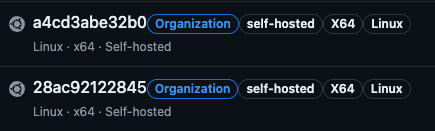
Now, I can create them with this Dockerfile whenever needed!
Conclusion
This concludes the process of creating a GitHub self-hosted runner with Docker. If I get a chance to measure the time in the future, I will write an additional post.
Thank you.